
Building Your First Operator
Now that you understand the fundamentals of Kubernetes and the Operator SDK, let’s walk through the process of creating your first custom operator.
This guide assumes you have operator-sdk, kubectl, and a Kubernetes cluster (such as Minikube or Kind) ready to use.
Best Practice: Execute all commands within a Git repository and commit changes after each step as instructed. This approach will help you understand exactly what the Operator SDK and Makefile are doing at each stage.
Step 1: Install the Operator SDK
Follow the latest installation instructions on the official installation page.
Example (macOS with Homebrew):
brew install operator-sdk
Step 2: Scaffold Your Project
Use the Operator SDK CLI to create a new operator project:
operator-sdk init --domain=hogwarts.com --repo=github.com/mariobris/operator-sdk-demo --plugins=go/v4
Parameter Explanation:
--domain- Defines the domain for your Custom Resource APIs (used in API group names)
--repo- Sets the Go module path for your project
--plugins- Specifies the plugin version to use (go/v4 is the latest Go plugin version)
Let’s examine the newly created directory structure:
cmd- Contains the main application code
config- Kustomize manifests for deploying the Kubernetes operator
test- End-to-end tests and utilities
Dockerfile- Configuration for building a container image
Makefile- Automation scripts for building, running, testing, and deploying your Kubernetes operator
PROJECT- Metadata file defining the operator project configuration
📌 Commit all files at this stage!
Next, let’s create an API and controller:
operator-sdk create api --group=wizards --version=v1alpha1 --kind=MagicalOperator --resource=true --controller=true
Parameter Explanation:
--group- Defines the API group as
wizards --version- Sets the API version as
v1alpha1 --kind- Specifies
MagicalOperatoras the custom resource type (Kind) --resource- Creates the Custom Resource Definition (CRD)
--controller- Generates a controller that reconciles the resource
Use your IDE to see which files have changed (recommended) or check with git:
git status --short
New and Modified Files:
api/- Contains API definitions
controllers/- Houses the controller logic for managing MagicalOperator resources
config/- Updated with new CRDs and sample manifests
PROJECT file- Updated to reflect the new resource and controller
This scaffolding provides the foundation for building a custom Kubernetes operator designed to manage “magical” resources under the wizards.hogwarts.com API group.
📌 Commit all files at this stage!
Step 3: Update the CRD Schema
Open the generated api/v1alpha1/magicaloperator_types.go and config/samples/wizards_v1alpha1_magicaloperator.yaml files in your IDE side by side to define the structure of your custom resource.
Example:
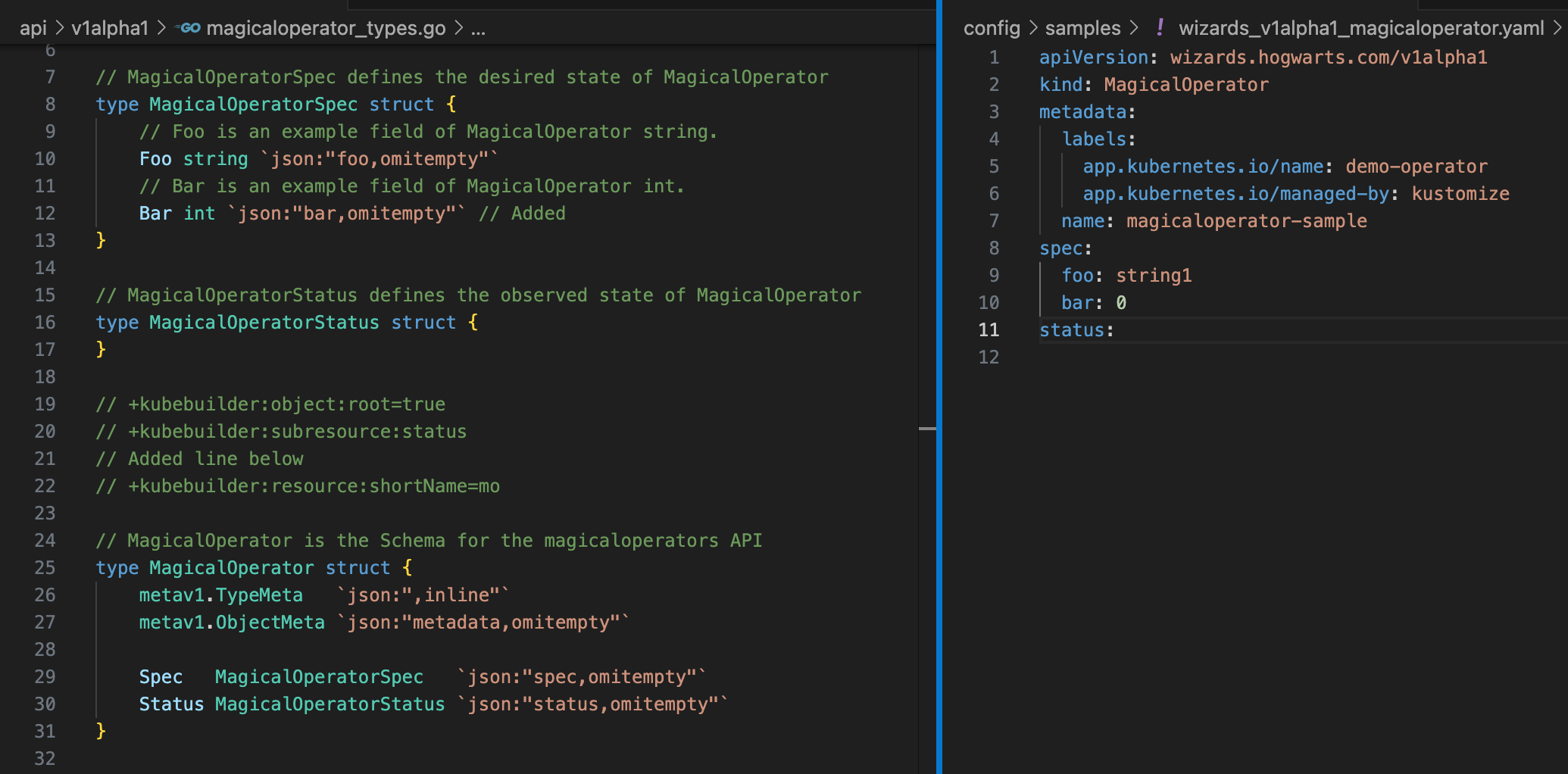
The CRD is defined by creating a MagicalOperator struct in Go. Note the +kubebuilder comments (Kubebuilder markers) — they are crucial for generating the proper CRD format.
Key Markers:
+kubebuilder:resource- Adds SHORTNAMES to the resource (e.g.,
shortName=mo) // Comments- Provide descriptions in the CRD
Run make manifests to update the CRD and observe how the CRD file changes. This command uses kubebuilder and its markers to generate the CRD automatically.
Now, install the CRD into Kubernetes and verify our new CRD:
make install
kubectl api-resources --api-group "wizards.hogwarts.com"
Example output:
NAME               SHORTNAMES   APIVERSION                      NAMESPACED   KIND
magicaloperators   mo           wizards.hogwarts.com/v1alpha1   true         MagicalOperator
Explore the CRD structure:
kubectl explain mo.spec
Example output:
GROUP:      wizards.hogwarts.com
KIND:       MagicalOperator
VERSION:    v1alpha1

FIELD: spec <Object>


DESCRIPTION:
    MagicalOperatorSpec defines the desired state of MagicalOperator

FIELDS:
  bar   <integer>
    Bar is an example field of MagicalOperator int.

  foo   <string>
    Foo is an example field of MagicalOperator string.
Not too difficult, right?
📌 Commit all files at this stage!
Step 4: Run the Operator Locally
Terminal 1: Start the controller
make run
Terminal 2: Deploy a MagicalOperator object
kubectl apply -f config/samples/wizards_v1alpha1_magicaloperator.yaml
kubectl get mo
Example output:
NAME                     AGE
magicaloperator-sample   113s
Note: The controller uses your local kubeconfig when running in development mode.
What’s Next
You’ve successfully scaffolded and run your first custom Kubernetes operator using the Operator SDK! Your operator is now responding to resource changes locally. In the next part, we’ll explore how to implement more sophisticated controller logic to handle resource lifecycle events and deploy your operator to a real Kubernetes cluster for production use.